第 14 章 · launch 进阶、测试与调试
本地运行
git clone https://github.com/wikieden/ros2-from-scratch
cd ros2-from-scratch/code/notebooks
pip install jupyterlab torch numpy
jupyter lab ch14_launch_subst.ipynb
也可以下载后直接用 VS Code 打开 .ipynb 运行。需要 GPU 的章节在 Colab 里选「代码执行程序 → 更改运行时类型 → GPU」。
本章回答:真实机器人的 launch 文件动辄几百行,怎么组织?参数、条件、"某个节点挂了就全关"怎么写?ROS 2 程序怎么写自动测试?节点崩了怎么拿到崩溃位置?回调到底花了多久怎么量?
讲解日期:2026-11-13 · 上一章:第 13 章 URDF 与 RViz · 下一章:第 15 章 实时与 ros2_control 架构
对应原文:ros2_documentation/source/Developer-Tools/Launch/下的Using-Substitutions.rst、Using-Event-Handlers.rst、Using-ROS2-Launch-For-Large-Projects.rst;ros2_documentation/source/Developer-Tools/Debugging/Testing/Integration.rst;ros2_documentation/source/Developer-Tools/Debugging/Getting-Backtraces-in-ROS-2.rst(路径相对ros2/materials/)
对应 study-plan 阶段 E1–E4,动手里程碑 R-M5(lifecycle + launch 事件 + 一个 launch_testing 测试)。
本章缩写:gdb = GNU Debugger(GNU 调试器);LTTng = Linux Trace Toolkit next generation(Linux 跟踪工具包:ros2_tracing 的底层);CI = Continuous Integration(持续集成:每次提交自动跑测试);pytest(Python 测试框架,不是缩写);unittest(Python 标准库的测试框架)。全部缩写见 附录 · 缩写与术语表
本章先看总图,再分 3 步:
| 步 | 内容 | 状态 |
|---|---|---|
| 0 | 总图:一次 ros2 launch 的展开过程 |
✅ |
| 1 | launch 进阶:参数、替换、条件、包含、分组、事件 | ✅ |
| 2 | 测试:单元测试、colcon test、launch_testing 集成测试 |
✅ |
| 3 | 调试:gdb 拿崩溃栈、日志、ros2_tracing 测回调耗时 | ✅ |
讲解
总图 · 一次 launch 的展开
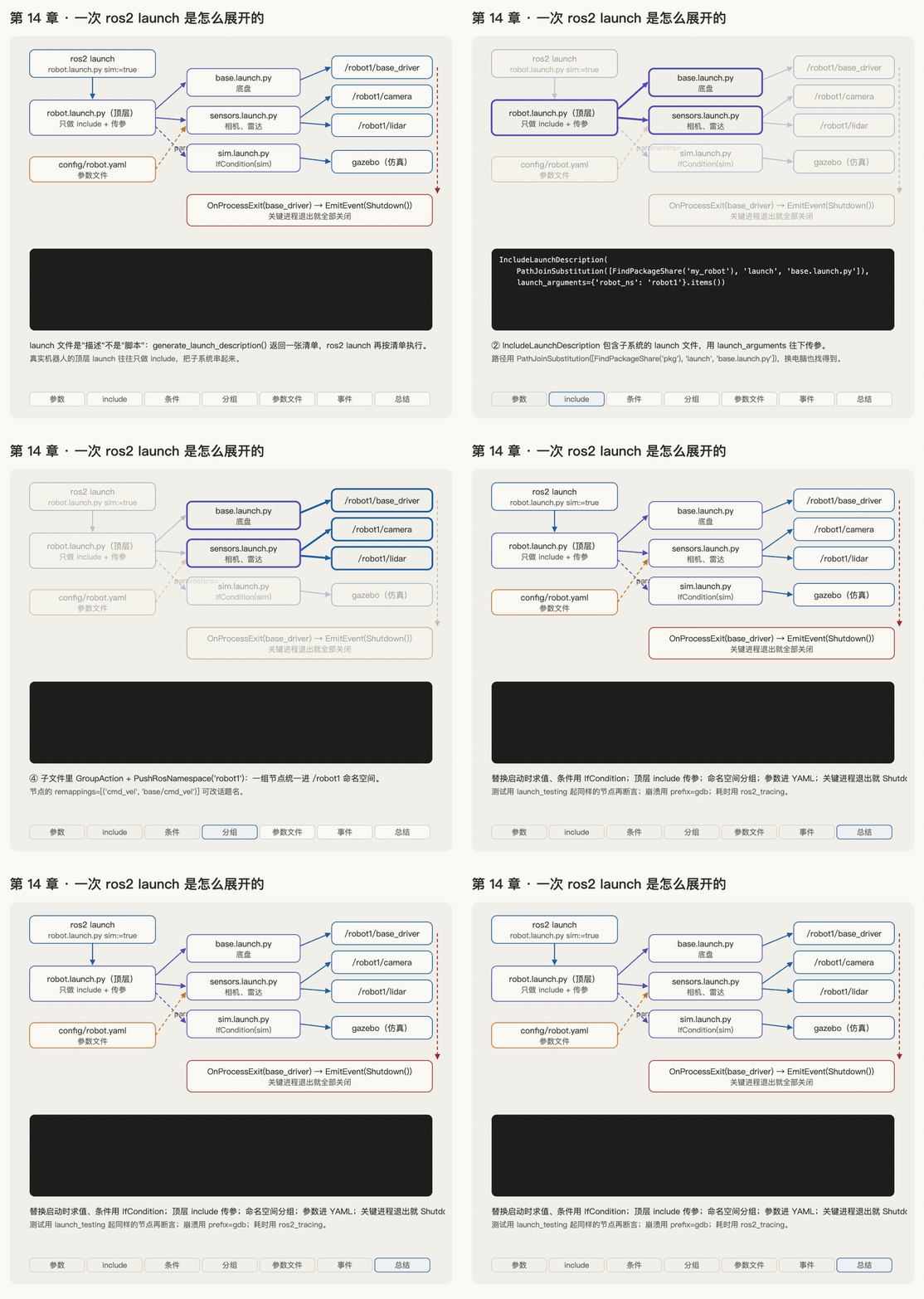
可交互版:animations/14-launch-expand.html(内置浏览器:http://localhost:8340/14-launch-expand.html)。
关键概念:launch 文件是"描述",不是"脚本"。 generate_launch_description() 返回的是一张清单(第 3 章),里面的 LaunchConfiguration('x') 之类叫替换(substitution):写文件时只是个占位,启动时才求值(Developer-Tools/Launch/Using-Substitutions.rst)。所以在 Python launch 文件里不能直接 if LaunchConfiguration('sim') == 'true':,因为那时它还没有值;要用条件动作。
第 1 步 · launch 进阶
依据:Developer-Tools/Launch/ 下的教程及其 launch/ 示例文件(下称"launch 示例")。
参数(launch argument)+ 替换(launch/example_substitutions_launch.py):
from launch import LaunchDescription
from launch.actions import DeclareLaunchArgument, TimerAction, ExecuteProcess
from launch.conditions import IfCondition
from launch.substitutions import LaunchConfiguration, PythonExpression
from launch_ros.actions import Node

def generate_launch_description():
    turtlesim_ns = LaunchConfiguration('turtlesim_ns')                 # 占位
    return LaunchDescription([
        DeclareLaunchArgument('turtlesim_ns', default_value='turtlesim1'),  # 声明 + 默认值
        Node(package='turtlesim', executable='turtlesim_node',
             namespace=turtlesim_ns, name='sim'),                     # 启动时才代入
        TimerAction(period=2.0, actions=[ ... ]),                      # 2 秒后再做
    ])
命令行传值:ros2 launch launch_tutorial example_substitutions_launch.py turtlesim_ns:=robot7。ros2 launch <包> <文件> --show-args 列出所有可传的参数。
常用替换和动作:
| 名字 | 作用 |
|---|---|
LaunchConfiguration('x') |
取 launch 参数 x 的值 |
PathJoinSubstitution([FindPackageShare('pkg'), 'config', 'a.yaml']) |
拼出某个包安装目录下的文件路径 |
Command(['xacro ', urdf_path]) |
启动时执行命令,取输出(第 13 章把 xacro 展开成 URDF) |
PythonExpression([...]) |
启动时求一个 Python 表达式 |
IfCondition(...) / UnlessCondition(...) |
条件:满足才执行这个动作(比如只在仿真时启动 Gazebo) |
TimerAction(period=, actions=) |
延时执行 |
ExecuteProcess(cmd=...) |
启动任意命令 |
IncludeLaunchDescription(...) |
包含另一个 launch 文件,并传参 |
GroupAction + PushRosNamespace('ns') |
把一组节点统一放进某个命名空间 |
SetParameter / Node(parameters=[yaml路径, {...}]) |
设参数:可混用 YAML 文件和字典 |
Node(remappings=[('cmd_vel', 'base/cmd_vel')]) |
重映射话题 |
大项目的组织方式(Using-ROS2-Launch-For-Large-Projects.rst,launch/example_main_launch.py):一个顶层 launch 文件只负责 IncludeLaunchDescription 各子系统(底盘、传感器、导航、机械臂),通过参数把"用哪个机器人型号、是否仿真"往下传;参数统一放 config/*.yaml。
IncludeLaunchDescription(
    PathJoinSubstitution([FindPackageShare('launch_tutorial'), 'launch', 'example_substitutions_launch.py']),
    launch_arguments={'turtlesim_ns': 'turtlesim2', 'use_provided_red': 'True'}.items())
事件处理(Using-Event-Handlers.rst,launch/example_event_handlers_launch.py):监听"进程启动 / 有输出 / 动作执行完 / 进程退出 / launch 要关闭",触发别的动作。
| 处理器 | 什么时候触发 | 典型用法 |
|---|---|---|
OnProcessStart |
某进程启动后 | 模拟器起来后再去调 /spawn |
OnProcessIO |
某进程有输出时 | 看到某行日志再做下一步 |
OnExecutionComplete |
某动作执行完 | 串行步骤 |
OnProcessExit |
某进程退出 | 关键节点退出,就 EmitEvent(Shutdown()) 关掉全部 |
OnShutdown |
launch 整体要关闭时 | 打印原因、收尾 |
官方例子里:turtlesim 窗口被关闭(进程退出)→ 打日志 + 发出 Shutdown 事件,整个 launch 退出。真机上,驱动节点崩了就让整套系统停下,比"半残运行"安全得多。
托管节点 + launch(接第 11 章):用 launch_ros.actions.LifecycleNode 启动,再用事件处理器监听它的状态变化,"进入 inactive 后自动发 activate"。节点多时直接用 Nav2 式的生命周期管理器更省事。
组件 + launch(接第 10 章):ComposableNodeContainer(package='rclcpp_components', executable='component_container', composable_node_descriptions=[ComposableNode(...), ...])(Launching-composable-nodes.rst)。
Python / XML / YAML 怎么选(Launch-file-different-formats.rst):简单的启动清单用 XML / YAML,短且好读;需要复杂逻辑用 Python。Lyrical 给 XML / YAML 加了 string-join、path-join 替换,也支持在 launch 里按条设日志级别(Release-Lyrical-Luth.rst)。
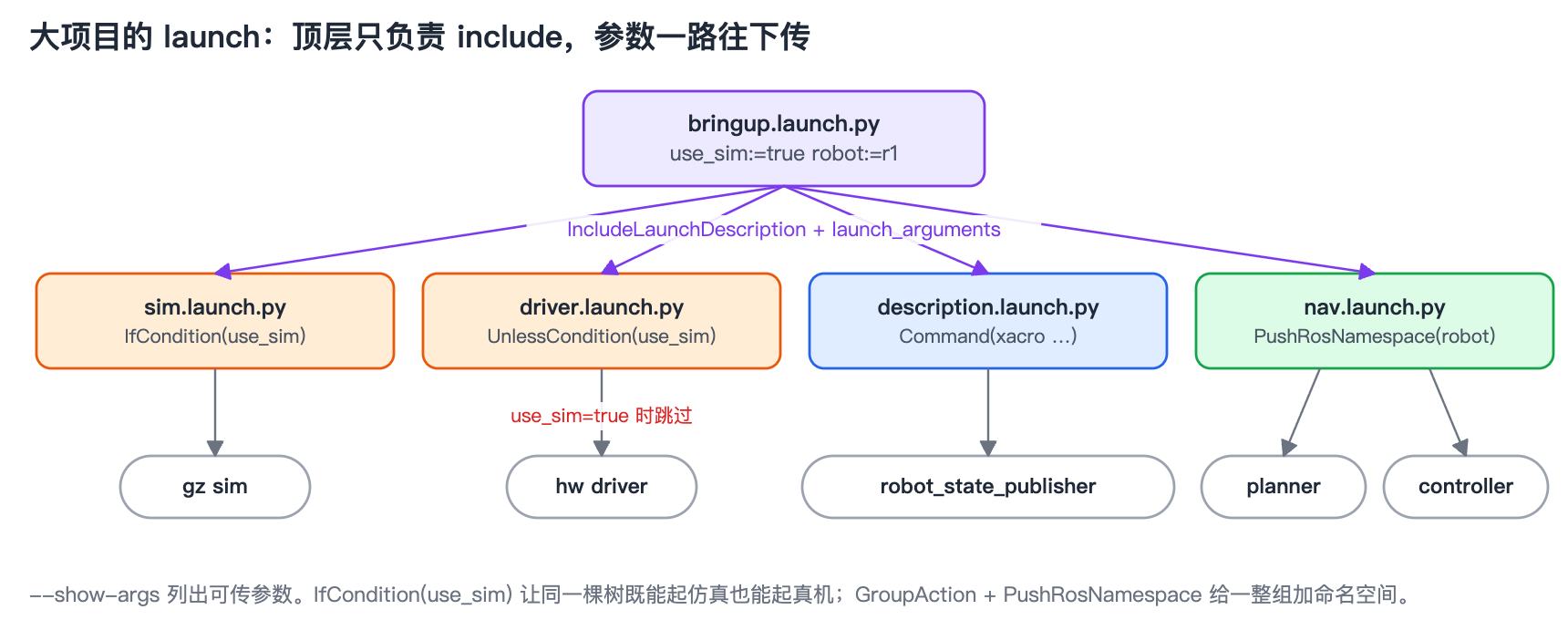
图 14-1 · 大项目的 launch:顶层只 include 子文件并往下传参数,用条件决定起仿真还是真机。
第 2 步 · 测试
依据:Developer-Tools/Debugging/Testing/ 下各页。
三层测试:
| 层 | 测什么 | 工具 |
|---|---|---|
| 单元测试 | 一个函数、一个类,不起 ROS | Python 用 pytest;C++ 用 gtest |
| 节点 / 集成测试 | 把节点真的启动起来,看它对外的话题、服务行为对不对 | launch_testing |
| 静态检查 | 代码风格、拷贝许可证头等 | ament_lint(建包时自动带的 test_depend) |
跑测试(Testing/CLI.rst):
colcon test --packages-select my_package
colcon test-result --all --verbose       # 看结果
colcon test --packages-select my_package --pytest-args -k test_speed_limit   # 只跑某个测试
Python 包要在 setup.py 的 extras_require / tests_require 里声明 pytest,测试文件放 test/,函数名以 test_ 开头(Testing/Python.rst)。
集成测试 launch_testing(Testing/Integration.rst):在一个 Python 文件里:
generate_test_description():像 launch 文件一样启动被测节点,最后加launch_testing.actions.ReadyToTest();- 活动测试(active tests):节点运行期间执行的
unittest.TestCase,比如"发一条cmd_vel,在 2 秒内应该收到位姿变化",可以用launch_testing_ros的WaitForTopics等待话题; - 关闭后测试(post-shutdown tests):所有节点退出后检查,比如"退出码都是 0"。
CMake 包里用 add_launch_test(test/my_test.py) 注册,colcon test 一起跑。每次提交都自动跑一遍(CI),是避免"改了 A 坏了 B"的唯一可靠办法。
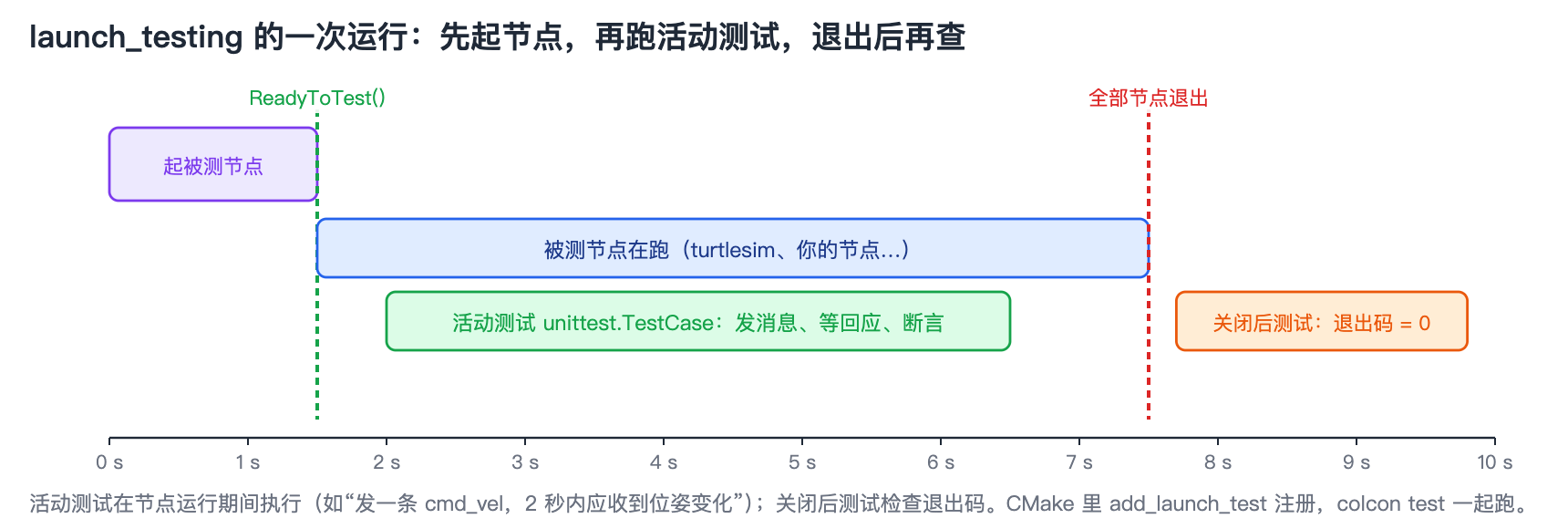
图 14-2 · launch_testing:ReadyToTest 后跑活动测试,所有节点退出后再跑关闭后测试。
第 3 步 · 调试
崩溃:用 gdb 拿调用栈(Developer-Tools/Debugging/Getting-Backtraces-in-ROS-2.rst,C++ 节点):
ros2 run --prefix 'gdb -ex run --args' my_package my_node
# 崩溃后在 (gdb) 提示符下输入:backtrace,从下往上读
launch 里给 Node(...) 加 prefix=['xterm -e gdb -ex run --args']。编译时用 --cmake-args -DCMAKE_BUILD_TYPE=RelWithDebInfo 保留调试信息。Python 节点崩溃本来就有完整的异常栈。
日志(第 3 章):--log-level debug、rqt_console 过滤、~/.ros/log/ 里翻历史。
"回调到底花了多久":ros2_tracing(Developer-Tools/Introspection-and-analysis/Tracing/ROS2-Tracing-Trace-and-Analyze.rst):ROS 2 的核心库里预埋了跟踪点,用 LTTng 记录每次回调的开始、结束、消息发布与接收,开销很小;再用 tracetools_analysis 在 Jupyter 里画出回调耗时分布、端到端延迟。Linux 二进制默认已编入跟踪点;Lyrical 起可用环境变量 TRACETOOLS_RUNTIME_DISABLE=1 完全关掉,还新增了"快照模式"(只在内存里滚动保存,出事时才落盘,像飞机黑匣子)(Release-Lyrical-Luth.rst 对应两节)。
其他排查命令回顾:ros2 doctor --report(第 8 章)、topic info -v(第 7 章)、view_frames(第 12 章)、ros2 lifecycle get(第 11 章)。
和本仓库的连接:R-M10 要量"图像进来 → 动作出去"的端到端延迟和抖动,ros2_tracing 是最准的工具;VLA 策略节点的回归测试("给定这张图,动作输出的形状和范围对不对")用 launch_testing 写。
练习与作答记录
练习 14-1(第 1 步):写一个 launch 参数 use_sim(默认 false),只有 use_sim 为 true 时才启动一个 gazebo 进程。用到哪两个类?
- 作答:(待作答)
练习 14-2(第 1 步):你想让"底盘驱动节点一退出,整个 launch 就关闭"。用哪个事件处理器、触发什么动作?
- 作答:(待作答)
练习 14-3(第 2 步):launch_testing 里的"活动测试"和"关闭后测试"各适合检查什么?各举一个例子。
- 作答:(待作答)
练习 14-4(第 3 步):一个 C++ 节点启动后立刻段错误(segfault)退出,你怎么拿到崩溃位置?
- 作答:(待作答)
口诀
- launch 是描述不是脚本:替换启动时才求值,判断要用
IfCondition。 - 大项目:顶层只做 include,参数往下传,配置进 YAML,命名空间分组。
- 事件:关键进程退出就 Shutdown,别让系统半残。
- 测试三层:pytest 测函数,launch_testing 测节点,ament_lint 查风格;
colcon test一起跑。 - 调试:崩溃 gdb 看栈,行为看日志,耗时用 tracing。
本章复习卡片编号
R34–R35,见 ../review.md。
附录 · 延伸阅读
留给以后深入学习用,不影响本章主线。★ 是建议先读的。
materials/指ros2/materials/;不带前缀的路径在materials/ros2_documentation/source/下(design/、ecosystem/开头的在materials/下);...表示省略了和上一条相同的目录。
推荐阅读
| 读什么 | 读哪里 | 读它为了什么 |
|---|---|---|
★ Launch |
materials/ros2_documentation/source/Developer-Tools/Launch/ |
Creating-Launch-Files.rst、Using-Substitutions.rst、Using-Event-Handlers.rst、Using-ROS2-Launch-For-Large-Projects.rst、Launching-composable-nodes.rst、Launch-file-different-formats.rst,示例在 launch/ 子目录(Py / XML / YAML 三种写法并列)。 |
150_roslaunch.md |
materials/design/articles/150_roslaunch.md、151_roslaunch_xml.md、152_roslaunch_frontend.md |
launch 系统设计。 |
★ Testing |
Developer-Tools/Debugging/Testing/ |
CLI.rst(colcon test)、Python.rst、Cpp.rst、Integration.rst(launch_testing)。 |
Getting-Backtraces-in-ROS-2.rst |
Developer-Tools/Debugging/Getting-Backtraces-in-ROS-2.rst、ROS-2-IDEs.rst、Debugging-Tf2-Problems/。 |
— |
★ ROS2-Tracing-Trace-and-Analyze.rst |
Developer-Tools/Introspection-and-analysis/Tracing/ROS2-Tracing-Trace-and-Analyze.rst、Developer-Tools/Debugging/Building-ROS-2-with-Tracing.rst。 |
— |
| 论文 | Bédard et al., "ros2_tracing: Multipurpose Low-Overhead Framework for Real-Time Tracing of ROS 2"(IEEE RA-L 2022),ros2_tracing 的设计与开销评估(本地未收录)。 | — |
数学原理
- 本章没有用到数学。
公式清单
| 公式 / 规则 |
|---|
参数取值:命令行 name:=value 优先于 default_value |
代码对照:把本章的数字用代码算一遍
纯 Python 模拟,不需要 ROS 2(原因见第 1 章这一节)。代码在仓库本地
ros2/solutions/chapter-code/ch14_launch_subst.py,配套测试tests/test_ch11_15.py;同名 notebook 在notebooks/ch14_launch_subst.ipynb(讲解和代码放在一起,一格一格跑)。Mac 上直接能跑:
bash
cd ros2/solutions/chapter-code
uv run python ch14_launch_subst.py   # 一步一步打印
uv run pytest tests/test_ch11_15.py
讲义 ↔ 代码:
| 讲义 | 规则 / 数字 | 写法 | 跑出来 |
|---|---|---|---|
| 总图 描述不是脚本 | 写下来的是占位 | type(description[0]['namespace']) |
LaunchConfiguration |
| 第 1 步 默认值 | default_value='turtlesim1' |
launch(description, declared, {}) |
/turtlesim1/sim |
| 第 1 步 命令行传参 | turtlesim_ns:=robot7 |
launch(..., {'turtlesim_ns': 'robot7'}) |
/robot7/sim |
| 第 1 步 Include 传参 | launch_arguments |
同上传 turtlesim2 | /turtlesim2/sim |
| 第 1 步 PushRosNamespace | 整组再套一层 | launch(..., namespace='robot1') |
/robot1/turtlesim1/sim |
| 第 1 步 其他替换 | PathJoin、PythonExpression | launch([node], ...) |
路径拼好;0.5 * 2 → 1.0 |
关键几行:
turtlesim_ns = LaunchConfiguration("turtlesim_ns")      # 占位,不是值
ctx = {**declared, **cli}                              # 命令行覆盖默认值
value.perform(ctx) if hasattr(value, "perform") else value   # 启动时才算
代码里才看得到的 3 件事:
ctx = {**declared, **cli}:后面的字典覆盖前面的,所以命令行的值优先于默认值。- PythonExpression 用的是
eval:真 launch 也是把几段拼成字符串再求值,所以字符串里的引号、空格都要自己写对。 - 条件(IfCondition)和事件处理器没有模拟,留给练习 14-1、14-2。
自己改一改(不影响练习答案):
- 在
description里再加一个 Node(比如name='teleop',同一个 namespace),看两个节点的名字; - 把
base_speed改成'0.3',看scale变成多少。