第 19 章 · CuTe:用 (Shape, Stride) 描述一切数据布局
本地运行
git clone https://github.com/wikieden/cuda-to-tensor-core
cd cuda-to-tensor-core/code/notebooks
pip install jupyterlab torch numpy
jupyter lab ch19_cute_layout.ipynb
也可以下载后直接用 VS Code 打开 .ipynb 运行。需要 GPU 的章节在 Colab 里选「代码执行程序 → 更改运行时类型 → GPU」。
本章回答:第 13–18 章里到处是"第几个线程读哪个地址"的手算下标,CUTLASS 3/4 用什么统一地管理它们?CuTe 的 Layout 为什么只要一对 (Shape, Stride)?列优先、行优先、分块、按线程切分、swizzle 怎么都用同一套写法表达?
讲解日期:2026-11-14 · 上一章:第 18 章 Hopper ② · 下一章:第 20 章 Blackwell
对应原文:CuTe 文档(materials/code/cutlass/cute-docs/):01_layout.md(569 行,构造第 130–220 行、坐标与 colexicographical 顺序第 372–400 行)、02_layout_algebra.md(composition 第 77 行、divide 第 381 行、product 第 482 行)、03_tensor.md(partition 第 276–333 行)、0x_gemm_tutorial.md(sgemm_1 → sgemm_sm80);GPU MODE L57 CuTe(text/gpu-mode-lecture-57-cute.txt);Colfax WGMMA / TMA 博客里的 CuTe 用法本章缩写:CuTe = CUDA Templates(CUTLASS 3 起的核心布局库,读作 "cute")· CUTLASS = CUDA Templates for Linear Algebra Subroutines(线性代数子程序的 CUDA 模板库)· TV layout = Thread-Value layout(线程–值布局:哪个线程拿哪些值)· DSL = Domain-Specific Language(领域专用语言)
讲解
第一步:所有下标公式都是"坐标点乘步长"(2026-11-14)
回顾一下前面手写过的下标:
| 章 | 公式 |
|---|---|
| 1 | i = blockIdx.x * blockDim.x + threadIdx.x |
| 6 | 行优先 A[r * N + c] |
| 7 | padding tile[r * 33 + c] |
| 13 | x = blockIdx.x * 32 + threadIdx.x / 32; y = ... + threadIdx.x % 32 |
它们都是同一个形状:把一个多维坐标,和一组步长逐项相乘再相加,得到一维的位置。CuTe 把这件事抽象成 Layout(01_layout.md):
A
Layoutis a tuple of (Shape,Stride)……it implements a mapping from any coordinate within the Shape to an index via the Stride.
写法是 Shape : Stride,例如 (4, 2) : (1, 4)。坐标 \((i, j)\) 映射到
数字演示:
| Layout | 含义 | (0,0) | (1,0) | (0,1) | (3,1) |
|---|---|---|---|---|---|
(4,2):(1,4) |
4 × 2 列优先:一列内相邻元素相差 1 | 0 | 1 | 4 | 7 |
(4,2):(2,1) |
4 × 2 行优先:一行内相邻元素相差 1 | 0 | 2 | 1 | 7 |
(4,2):(1,5) |
列优先,每列多 1 个 padding | 0 | 1 | 5 | 8 |
同一个"4 × 2 的矩阵",换个 Stride 就换了存储方式,用它的代码一个字都不用改——这正是文档开头说的:"a row-major MxN layout and a column-major MxN layout can be treated identically in software."
不写 Stride 时默认 LayoutLeft:步长是 Shape 从左往右的累乘(第 159 行),即"广义列优先"。注意这和 C 数组的行优先习惯相反。
第二步:层次化 Shape——一个维度还能再拆(2026-11-14)
CuTe 的 Shape 和 Stride 可以嵌套(IntTuple 的递归定义):(4, (2, 2)) : (2, (1, 8))。第二维看起来是"4 个",其实内部又分成 2 × 2,各有自己的步长。
这能表达普通二维下标写不出来的布局,比如"每 2 列交错存放"、Tensor Core fragment 里线程和元素的复杂对应(第 15 章的 Figure 82 就是这样一个 layout)。
一维坐标怎么对应多维坐标? CuTe 用 colexicographical 顺序(01_layout.md 第 381 行:从右往左读、最左边的维变化最快):对 Shape (4, 2),一维坐标 0, 1, 2, 3, 4… 对应 (0,0), (1,0), (2,0), (3,0), (0,1)…。于是每个 Layout 都可以当作"一维下标 → 位置"的函数来用。
第三步:layout 代数——分块就是除法(2026-11-14)
把 layout 看成函数,就可以对它做运算(02_layout_algebra.md):
| 运算 | 意思 | 用在哪 |
|---|---|---|
composition A ∘ B |
先用 B 把坐标变一次,再交给 A:函数复合 | 重排、reshape、swizzle |
logical_divide A / tile |
把 A 按 tile 切块:结果第一维是"块内",第二维是"第几块" | 第 13 章的 block tile、第 14 章的 thread tile |
logical_product A × B |
把 A 复制 B 次排成更大的布局 | 一个 MMA 原子重复铺满整个 warp tile |
| complement | A 没覆盖到的那部分 | divide 的内部实现 |
例子:一个 8 × 8 的矩阵按 4 × 4 分块,zipped_divide(layout, Shape<_4,_4>{}) 得到形如 ((4,4), (2,2)) 的 layout——第一维是块内坐标,第二维是块号。block (bx, by) 只要取第二维固定为 (bx, by) 的那一片,就拿到了自己的 tile,再也不用手写 blockIdx.x * BM + ...。
第四步:Tensor 与按线程切分(2026-11-14)
Tensor = 指针 + Layout(03_tensor.md)。有了 Tensor,GEMM 的一层层分块写成(0x_gemm_tutorial.md 的 sgemm_1.cu):
Tensor mA = make_tensor(make_gmem_ptr(A), make_shape(M, K), dA);          // 整个 A
Tensor gA = local_tile(mA, cta_tiler, cta_coord, Step<_1, X, _1>{});     // 本 block 的 tile(沿 K 还有多块)
Tensor sA = make_tensor(make_smem_ptr(smemA), sA_layout);                 // shared 里的 tile
Tensor tAgA = local_partition(gA, tA, threadIdx.x);                       // 本线程负责搬的那部分
Tensor tAsA = local_partition(sA, tA, threadIdx.x);
copy(tAgA(_,_,k), tAsA);                                                  // 搬
tA 是一个线程布局(比如 32 × 8 个线程怎么排),local_partition 用它把 tile 切给每个线程——第 6 章"让 threadIdx.x 对应最快变化的那一维"变成了"选一个合适的线程 layout"。
再往上一层,CuTe 把硬件指令包装成 Atom(0t_mma_atom.md):MMA_Atom 描述一条 mma.sync / wgmma / tcgen05.mma 需要的 TV layout(哪个线程拿哪些值),Copy_Atom 描述一条 cp.async / ldmatrix / TMA。再用 TiledMMA、TiledCopy 把原子铺满整个 tile。换架构时主要是换 Atom,算法结构不用变——这就是 sgemm_1 → sgemm_2 → sgemm_sm80 → hopper/wgmma_tma_sm90 那条教程线的意义(study-plan M6)。
第五步:swizzle 也是一个 layout(2026-11-14)
第 7、15 章的 swizzle(地址异或重排防 bank conflict)在 CuTe 里是 Swizzle<B, M, S> 函数,和普通 layout 复合:composition(Swizzle<3,3,3>{}, smem_layout)。TMA 的 tensor map 里选的 128B swizzle 模式、wgmma 要求的 shared memory 布局(Colfax WGMMA 博客 "SMEM layout constraints"),在 CuTe 里就是几个预定义的 layout atom。
第六步:为什么值得学,以及 CuTe DSL(2026-11-14)
- CUTLASS 3/4 全部建立在 CuTe 上;FlashAttention-3 用 CuTe C++,FlashAttention-4、Quack 用 CuTe DSL(Python 写,编译快 20–30 倍,02 生态 自测题 3)。读这些代码,绕不开 layout 记号。
- Rust 没有对应物(03 Rust vs C++ §3),这是 C++ / Python 路线目前的独有优势。
- 学习曲线陡:先把
(Shape):(Stride)和 divide 弄熟,再看 TiledMMA。GPU MODE L57 是一个很好的入门讲座。
动画演示:同一个矩阵,三种 layout
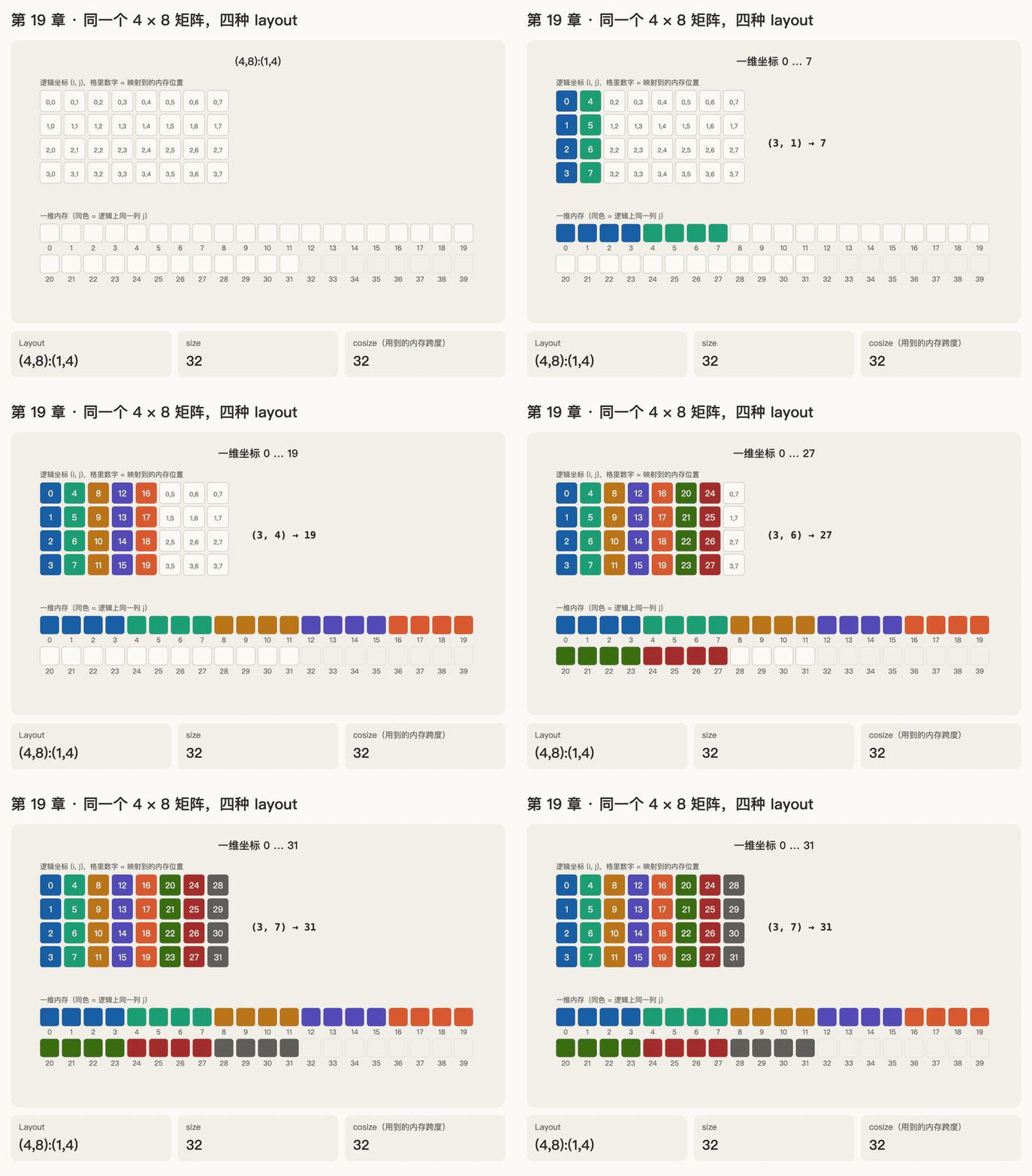
可交互版:animations/19-cute-layout.html。开关:Layout(列优先 (4,8):(1,4) / 行优先 (4,8):(8,1) / padding (4,8):(1,5) / 2 × 2 分块 ((2,2),(2,4)):((1,4),(2,8)))。
怎么看:
- 左边是 4 × 8 的逻辑坐标网格,右边是一维内存(0–39);
- 每一帧按 colexicographical 顺序点亮一个坐标,画出它映射到的内存位置,显示
index = Σ coord × stride的算式; - 切换 layout:逻辑网格不变,内存里的排列变了;
- 分块 layout 下,同一个 2 × 2 小块的 4 个元素在内存里连续。
练习与作答记录
题 1:Layout (3, 4) : (4, 1) 是行优先还是列优先?坐标 (2, 1) 映射到几?按 colexicographical 顺序,一维坐标 5 对应哪个二维坐标、映射到几?
作答:(待作答)
题 2:第 7 章的 __shared__ float tile[32][33](按 C 的习惯 tile[r][c])写成 CuTe Layout 是什么?
作答:(待作答)
题 3:为什么说"换架构时主要换 Atom"?结合第 15–18 章说说从 Ampere 到 Hopper,GEMM 里哪两类 Atom 换了、各换成了什么。
作答:(待作答)
口诀
下标都是坐标点乘步长:Layout = Shape : Stride;
不写步长默认左边快(列优先),和 C 数组反着来;
形状能嵌套,一维也能拆两半;
分块是除法,铺满是乘法,重排是复合,swizzle 也是一个 layout;
Tensor = 指针 + Layout;硬件指令包成 Atom,换卡只换 Atom。
本章复习卡片
- C45(CuTe Layout = (Shape, Stride),index = Σ coord × stride;默认 LayoutLeft;colexicographical 顺序)
- C46(layout 代数:composition / divide / product 的用途;Tensor = 指针 + Layout;MMA_Atom / Copy_Atom)
附录 · 延伸阅读
留给以后深入学习用,不影响本章主线。★ 是建议先读的。
推荐阅读
| 读什么 | 读哪里 | 读它为了什么 |
|---|---|---|
★ 01_layout.md |
code/cutlass/cute-docs/01_layout.md |
Layout 的定义、构造、打印、坐标体系 |
★ 02_layout_algebra.md |
同目录;composition 第 77 行、divide 第 381 行、product 第 482 行 | layout 代数,配大量手算例子 |
| ★ GPU MODE L57 CuTe | text/gpu-mode-lecture-57-cute.txt |
讲座字幕,比文档好入门 |
03_tensor.md |
同目录;partition 第 276–333 行 | Tensor、tile、slice、按线程切分 |
0x_gemm_tutorial.md |
同目录;sgemm_1 第 7 行起、TiledCopy / TiledMMA 第 379–438 行 | 完整 GEMM 一步步怎么写(M6 里程碑) |
0t_mma_atom.md、0z_tma_tensors.md |
同目录 | MMA Atom、TMA 在 CuTe 里的表示 |
cute-dsl-docs/ |
code/cutlass/cute-dsl-docs/ |
Python 版 CuTe(FA4、Quack 用的) |
| Colfax 三篇博客 | text/blog-colfax-*.txt |
CuTe 在 TMA / WGMMA / TMEM 上的实际用法 |
数学原理
- Layout 是函数:\(L: \mathbb{Z}^{\text{shape}} \to \mathbb{Z}\),\(L(c) = \sum_i c_i s_i\)(对嵌套 shape 递归展开)。
- colexicographical 一维化:Shape \((n_0, n_1, \dots)\) 下,一维坐标 \(x\) 对应 \(c_0 = x \bmod n_0\),\(c_1 = \lfloor x / n_0 \rfloor \bmod n_1\),……
- composition:\((A \circ B)(c) = A(B(c))\);divide 用 composition 加 complement 定义(
02_layout_algebra.md第 381–414 行)。 - cosize:\(L(\text{size}-1) + 1\),layout 实际用到的内存跨度(padding 时大于 size)。
公式 / 代码清单
| 名称 | 代码 |
|---|---|
| 建 layout | auto L = make_layout(make_shape(4, 2), make_stride(1, 4)); |
| 用 layout | int idx = L(i, j);;print_layout(L); |
| 建 tensor | Tensor t = make_tensor(make_gmem_ptr(p), L); |
| 取 block tile | local_tile(mA, tiler, coord, Step<_1, X, _1>{}) |
| 按线程切分 | local_partition(gA, thr_layout, threadIdx.x) |
| swizzle | composition(Swizzle<3,3,3>{}, smem_layout) |
代码对照:把本章的数字用代码算一遍
用 NumPy 在 CPU 上模拟同样的规则。代码在仓库本地
cuda-programming/solutions/chapter-code/ch19_cute_layout.py,配套测试tests/test_ch19_23.py;同一章的 notebook:notebooks/ch19_cute_layout.ipynb(讲解和代码放在一起,一格一格边读边跑)。在线版不带代码文件,下面摘了关键几行。Mac 上直接能跑,不需要 GPU(CuTe 本身是 C++ 模板 / CuTe DSL;这里用几十行 Python 模拟它的下标算法):
bash
cd cuda-programming/solutions/chapter-code
uv run python ch19_cute_layout.py   # 一步一步打印
uv run pytest tests/test_ch19_23.py
讲义 ↔ 代码:
| 讲义 | 公式 / 说法 | 写法 | 跑出来 |
|---|---|---|---|
| 第一步 三种 Stride | index = \(\sum\) 坐标 × 步长 | Layout((4, 2), (1, 4))(c) 等 |
(1,0)→1/2/1,(0,1)→4/1/5,(3,1)→7/7/8 |
| 第一步 默认 Stride | LayoutLeft | Layout((4, 2)) |
(4, 2):(1, 4) |
| 第二步 colexicographic | 最左边的维变化最快 | idx2crd(i, (4, 2)) |
0..7 → (0,0)(1,0)(2,0)(3,0)(0,1)… |
| 第二步 嵌套 | (4,(2,2)):(2,(1,8)) |
Layout(...)((1, (1, 1))) |
2 + 1 + 8 = 11 |
| 第三步 按 tile 切块 | zipped_divide |
zipped_divide_2d(8, 8, (4, 4)) |
形状 ((4,4),(2,2));块 (1,0) 等于直接切片 |
| 第五步 swizzle | Swizzle<3,3,3> |
swizzle(i) |
0..511 的一个排列 |
关键几行:
class Layout:
    def __init__(self, shape, stride=None):
        self.stride = stride or left_strides(shape)   # 默认:Shape 从左往右累乘
    def __call__(self, coord):
        if isinstance(coord, int):                     # 一维坐标 → 多维(colex)
            coord = idx2crd(coord, self.shape)
        return sum(c * d for c, d in zip(flatten(coord), flatten(self.stride)))
代码里才看得到的 3 件事:
- NumPy 默认是行优先,CuTe 默认是列优先:验证分块时要写
np.arange(64).reshape(8, 8, order="F")(F = Fortran 顺序,即列优先),不然对不上。 - 嵌套坐标先摊平再点乘:
(1, (1, 1))摊平成 1、1、1,和摊平的步长 2、1、8 点乘——这就是"层次化 Shape"在计算上的全部意思。 zipped_divide_2d只是 2D 的特例:CuTe 的logical_divide对任意嵌套 layout 都成立,靠的是 complement 和 composition;这里只演示结果长什么样。
自己改一改(不影响练习答案):
- 把
zipped_divide_2d(8, 8, (4, 4))换成按 2 × 4 分块,看结果的形状和块 (1, 1) 的下标。 - 把
swizzle的参数换成 (2, 3, 3)、(3, 4, 3),看前 80 个数怎么排。