第 2 章 · Tensor 内部:一块内存 + 一张"怎么读"的说明书
本地运行
git clone https://github.com/wikieden/pytorch-inside-out
cd pytorch-inside-out/code/notebooks
pip install jupyterlab torch numpy
jupyter lab ch02_tensor_stride.ipynb
也可以下载后直接用 VS Code 打开 .ipynb 运行。需要 GPU 的章节在 Colab 里选「代码执行程序 → 更改运行时类型 → GPU」。
本章回答:一个 Tensor 里面到底存了什么?为什么
x.t()、x[:, 1:]几乎不花时间?什么叫 contiguous,为什么view有时会报错?
讲解日期:2026-11-14 · 上一章:第 1 章 一行代码的旅程 · 下一章:第 3 章 分派器
对应原文:00-overview.md §2.1;官方文档 Tensor Views(〔在线〕docs.pytorch.org/docs/stable/tensor_view.html);ezyang「PyTorch internals」Tensor 一节(〔在线〕)本章缩写:dtype = data type(数据 / 类型);numel = number of elements(元素 / 个数);全部缩写见 附录 · 缩写与术语表
讲解
第一步:Tensor = 一排数 + 说明书(2026-11-14)
内存是一维的,像一条很长的走廊,每个格子放一个数。可我们要的是 2 行 3 列的表格。怎么办?
类比:电影院座位。 电影院的座位票其实是从 0 开始连续编号的(0、1、2、3…)。要说"第 1 排第 2 座",就得知道"每排几个座":第 1 排第 2 座 = 1 × 3 + 2 = 5 号。
Tensor 就是这样:
| 部分 | 叫什么 | 例子 x = torch.arange(6).view(2, 3) |
|---|---|---|
| 一排数 | storage(存储) | [0, 1, 2, 3, 4, 5] |
| 几行几列 | shape(形状,也叫 size) | (2, 3) |
| 每个维度走一步跳几格 | stride(步长) | (3, 1):换一行跳 3 格,换一列跳 1 格 |
| 从第几格开始 | storage_offset(偏移) | 0 |
| 每个数什么类型 | dtype | torch.int64 |
| 放在哪 | device | cpu |
取元素的公式:
读法:offset 加上"行号乘行步长"再加"列号乘列步长"。
数字演示:x[1, 2] → 0 + 1 × 3 + 2 × 1 = 5,storage 第 5 格就是 5 ✓。
x = torch.arange(6).view(2, 3)
x.shape, x.stride(), x.storage_offset()   # (torch.Size([2, 3]), (3, 1), 0)
一句话:Tensor 不是"一张表",而是"一排数 + 一张怎么把它看成表的说明书(shape、stride、offset)"。
第二步:view 只改说明书,不搬数(2026-11-14)
既然"表格"只是说明书,那很多操作只要改说明书,数一个都不用动。这类操作叫 view(视图),结果和原张量共用同一块 storage。
转置 x.t():行列互换。不搬数,只把 shape 和 stride 都对调:
| shape | stride | offset | |
|---|---|---|---|
x |
(2, 3) | (3, 1) | 0 |
x.t() |
(3, 2) | (1, 3) | 0 |
验证:x.t()[2, 1] 应该等于 x[1, 2] = 5。用公式:0 + 2 × 1 + 1 × 3 = 5 ✓。
切片 x[:, 1:](每行去掉第 0 列):shape (2, 2),stride 还是 (3, 1),offset 变成 1。[0, 0] 位置 = 1 + 0 + 0 = 1 ✓(原来的 x[0, 1])。
证明共用内存:改视图,原张量跟着变。
t = x.t()
t[0, 0] = 100
x[0, 0]                       # tensor(100):改的是同一格
x.data_ptr() == t.data_ptr()  # True
常见的 view 操作:view、t / transpose / permute、切片、unsqueeze / squeeze、expand、narrow、unflatten。
一句话:view = 新说明书 + 旧 storage;几乎零开销,但改一个另一个也变。
第三步:contiguous——说明书是不是"老老实实按行排"(2026-11-14)
contiguous(连续):stride 恰好是"行优先、紧挨着排"的那一种。shape (2, 3) 的标准 stride 是 (3, 1);shape (3, 2) 的标准 stride 是 (2, 1)。
x.t() 的 shape 是 (3, 2),stride 却是 (1, 3),不是标准的 (2, 1),所以 不连续:
x.is_contiguous()      # True
x.t().is_contiguous()  # False
为什么 view 会报错:view(6) 要把张量"拉成一行",要求按行读出来的顺序正好是 storage 里的顺序。x.t() 按行读是 0, 3, 1, 4, 2, 5,而 storage 里是 0, 1, 2, 3, 4, 5,光改说明书做不到,只能真的搬数。所以:
| 写法 | 结果 |
|---|---|
x.t().view(6) |
报错(RuntimeError:view size is not compatible…) |
x.t().contiguous().view(6) |
先复制成标准排法,再 view:[0, 3, 1, 4, 2, 5] |
x.t().reshape(6) |
能 view 就 view,不能就自动复制,结果同上 |
为什么在乎连续:很多 kernel 假设数据连续,碰到不连续的输入会先偷偷复制一份;GPU 读不连续的内存也更慢(读相邻元素要跳着读)。性能分析里看到莫名其妙的 copy_ / contiguous,多半是这里来的。
一句话:contiguous = 按行老实排;转置、permute 后通常不连续,view 不了就用 reshape 或先 .contiguous()(会复制)。
第四步:stride = 0——不复制的"广播"(2026-11-14)
stride 可以是 0:这一维走一步,内存一格不动,等于同一个数被"看"了很多遍。
b = torch.tensor([10, 20, 30])        # shape (3,), stride (1,)
B = b.expand(4, 3)                     # shape (4, 3), stride (0, 1)
4 行都读同一段内存,没有复制。对比 b.repeat(4, 1):真复制出 12 个数。广播加法 x + b(第 11 章)内部就是这么做的。
一句话:stride 0 = 一份数据假装成很多份;expand 不花内存,repeat 才真复制。
动画演示:同一块内存,三份说明书
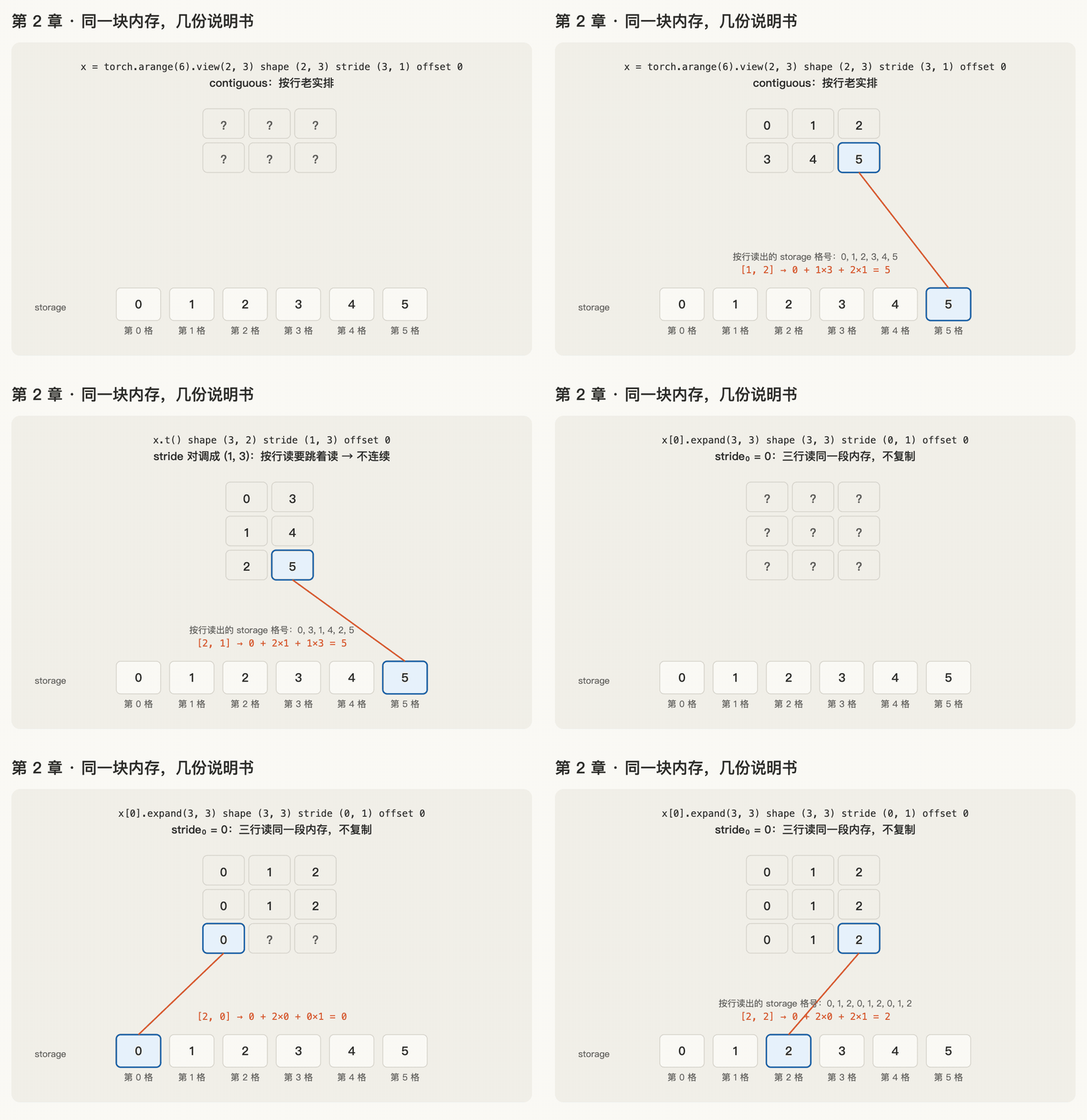
可交互版:animations/02-tensor-stride.html。按钮切换四种看法:原张量 / 转置 / 切片 / expand。
怎么看:
- 下面一排是 storage(一维内存),上面是按说明书摆出来的表格;
- 依次点亮表格的每个格子,连线指向它在 storage 里的那一格,旁边写出 offset + i × stride₀ + j × stride₁ 的算式;
- 注意转置时连线是"跳着"读的,这就是不连续;expand 时几行连到同一段内存。
练习与作答记录
题 1:y = torch.arange(12).view(3, 4)。写出 y 的 shape 和 stride;用公式算 y[2, 1] 在 storage 的第几格。
作答:(待作答)
题 2:z = y.t()。写出 z 的 shape、stride、是否 contiguous;z.view(12) 会怎样?
作答:(待作答)
题 3:w = y[1:, 2:](去掉第 0 行和前两列)。写出 shape、stride、storage_offset;改 w[0, 0] = -1 后 y 哪个位置变了?
作答:(待作答)
口诀
一排数加说明书:shape 说几行几列,stride 说一步跳几格,offset 说从哪开始;
view 只换说明书,转置跳着读不连续;stride 为 0 一份当多份。
本章复习卡片
- P03(Tensor = storage + shape + stride + offset;元素位置公式)
- P04(view 不复制、共用内存;转置后不连续,
view报错用reshape/contiguous) - P05(stride 0 = expand 广播不复制;
repeat才复制)
附录 · 延伸阅读
★ 是建议先读的。
推荐阅读
| 读什么 | 读哪里 | 读它为了什么 |
|---|---|---|
| ★ ezyang「PyTorch internals」 | "Tensors" 与 "strides" 两节(〔在线〕blog.ezyang.com/2019/05/pytorch-internals/) | 本章的原型讲法,有 storage / stride 的经典示意图 |
| ★ 官方文档 Tensor Views | 全文(〔在线〕) | 哪些操作返回 view 的完整列表 |
| Tensor-Puzzles(srush) | 前 5 题(〔在线〕github.com/srush/Tensor-Puzzles) | 只用广播和 arange 写函数,练 stride 思维 |
| CUDA 讲义 第 6 章 合并访存 | 全章 | 为什么不连续的读法在 GPU 上慢 |
数学原理
- 行优先(row-major)的标准 stride:shape \((d_0, d_1, \dots, d_{n-1})\) 的 contiguous stride 是 \(s_k = \prod_{m>k} d_m\),最后一维是 1。例:(2, 3, 4) → (12, 4, 1)。
- 转置 = 交换 stride:对调第 a、b 维时,shape 和 stride 的第 a、b 项一起对调,storage 不动。
公式 / 代码清单
| 写法 | 意思 |
|---|---|
| \(\text{pos} = \text{offset} + \sum_k i_k s_k\) | 元素在 storage 中的位置 |
x.stride() / x.storage_offset() / x.data_ptr() |
看说明书 / 看起点 / 看内存地址 |
x.is_contiguous() / x.contiguous() |
是否标准排法 / 不是就复制成标准 |
view vs reshape |
必须能不复制 vs 不行就复制 |
expand vs repeat |
stride 0 假复制 vs 真复制 |
代码对照:把本章的数字用代码算一遍
用 torch 把讲义里的数字跑一遍。代码在仓库本地
pytorch-deep-dive/solutions/chapter-code/ch02_tensor_stride.py,配套测试tests/test_ch01_06.py;同一章的 notebook:notebooks/ch02_tensor_stride.ipynb(讲解和代码放在一起,一格一格边读边跑)。Mac 上直接能跑,不需要 GPU:
bash
cd pytorch-deep-dive/solutions/chapter-code
uv run python ch02_tensor_stride.py   # 一步一步打印
uv run pytest tests/test_ch01_06.py
讲义 ↔ 代码:
| 讲义 | 公式 / 说法 | 写法 | 跑出来 |
|---|---|---|---|
| 第一步 说明书 | pos = offset + Σ iₖ sₖ | describe(x)、position(0, (3, 1), (1, 2)) |
stride (3, 1);位置 5 |
| 第二步 转置 | stride 对调 | describe(x.t()) |
(3, 2)、stride (1, 3)、不连续 |
| 第二步 切片 | offset 变 | describe(x[:, 1:]) |
offset 1 |
| 第三步 view 报错 | 按行读 ≠ storage 顺序 | try_view_flat(x.t()) |
报错;reshape 得 [0, 3, 1, 4, 2, 5] |
| 第四步 stride 0 | expand 不复制 | b.expand(4, 3).stride() |
(0, 1);repeat 是 (3, 1) |
关键几行:
x = torch.arange(6).view(2, 3)
x.stride(), x.storage_offset()           # (3, 1), 0
t = x.t()                                # 只改说明书:stride (1, 3)
x.data_ptr() == t.data_ptr()             # True:共用一块内存
t.view(6)                                # RuntimeError:不连续
t.reshape(6)                             # 能 view 就 view,不能就复制
代码里才看得到的 2 件事:
x[:, 1:]也不连续:shape (2, 2) 的标准 stride 是 (2, 1),它是 (3, 1),is_contiguous()为 False。- 报错信息很长:
view size is not compatible with input tensor's size and stride,看到它就想到第三步。
自己改一改(不影响练习答案):
- 对
torch.arange(24).view(2, 3, 4)调describe,再permute(2, 0, 1)看 stride 怎么跟着换。 - 用
position手算一个三维张量元素的位置,再用下标取出来对一对。