第 25 章 · 让 GPU 别等:数据管道与同步点
本地运行
git clone https://github.com/wikieden/pytorch-inside-out
cd pytorch-inside-out/code/notebooks
pip install jupyterlab torch numpy
jupyter lab ch25_input_sync.ipynb
也可以下载后直接用 VS Code 打开 .ipynb 运行。需要 GPU 的章节在 Colab 里选「代码执行程序 → 更改运行时类型 → GPU」。
本章回答:怎么量出"GPU 有多少时间在等数据"?从读硬盘到进显存,每一段怎么提速?训练循环里藏着哪些同步点,怎么一次性把它们找出来?
讲解日期:2026-11-14 · 上一章:第 24 章 profiler · 下一章:第 26 章 混合精度
对应原文:AISPE ch13「优化数据输入流水线」(ch13.md第 1552–1561 行)、「重叠通信和计算」中的数据预取例子(第 1021–1097 行);官方文档 CUDA semantics「Use pinned memory buffers」、torch.cuda.set_sync_debug_mode(〔在线〕);本讲义 第 5 章、第 8 章本章缩写:H2D = Host to Device(主机到设备,CPU 内存拷进显存);memmap = memory-mapped file(内存映射文件);I/O = Input/Output;全部缩写见 附录 · 缩写与术语表
讲解
第一步:先量出"等数据"的时间(2026-11-14)
类比:厨房出菜慢,先分清是"等食材"还是"炒得慢"。
最简单的量法:给一步训练拆两段计时。
t0 = time.perf_counter()
for x, y in loader:
    t1 = time.perf_counter()                 # 拿到这一批:t1 - t0 是等数据的时间
    x, y = x.to(dev, non_blocking=True), y.to(dev, non_blocking=True)
    loss = train_step(x, y)
    torch.cuda.synchronize()                 # 只在测量时加!平时不要
    t2 = time.perf_counter()                 # t2 - t1 是训练的时间
    log(data=t1 - t0, compute=t2 - t1)
    t0 = time.perf_counter()
数字演示:测得等数据 18 ms、训练 30 ms → 每步 48 ms,GPU 有 37.5% 的时间在等数据。如果数据时间接近 0,瓶颈就不在数据,别在这里花功夫(第 23 章:只改瓶颈)。
注意那个 synchronize():为了测准才加(第 5 章),测完要删掉,它本身就是同步点。
一句话:把每步拆成"等数据"和"算"两段计时,数据段接近 0 就别优化数据。
第二步:数据从硬盘到显存的四段路(2026-11-14)
硬盘 ──① 读取──▶ CPU 内存 ──② 解码 / 增强 / 分词──▶ 张量 ──③ 拼 batch──▶ 锁页内存 ──④ 拷进显存──▶ GPU
| 段 | 慢的表现 | 提速办法 |
|---|---|---|
| ① 读取 | 网络盘、海量小文件 | 打包成大分片文件(WebDataset、Arrow、二进制 token 文件);本地 SSD 缓存;np.memmap 按需读 |
| ② 处理 | 图片解码、分词占满 CPU | 离线预处理(预先分词存成 token 数组,CS336 a1 就是这么做);num_workers 并行(第 8 章);GPU 上做增强 |
| ③ 拼 batch | 大量 Python 对象 | 让 __getitem__ 直接返回张量;collate 别做重活 |
| ④ 拷贝 | 拷贝和计算串行 | pin_memory=True + non_blocking=True;或者用单独的 stream 提前拷下一批(第 5 章第三步,AISPE ch13 第 1021–1097 行) |
LLM 预训练的标准做法:提前把全部语料分词成 uint16 / uint32 的 token 数组存盘,训练时 memmap 打开,每步随机切几个定长片段——第 ① ② ③ 段几乎都没了,只剩一次小拷贝。
一句话:读取、处理、拼 batch、拷贝四段;能离线做的离线做(预分词),剩下的并行(workers)和异步(pin + non_blocking)。
第三步:把同步点一次性揪出来(2026-11-14)
第 5 章列过同步点清单。实际代码里它们常常藏得很深:
| 藏在哪 | 例子 |
|---|---|
| 日志 | wandb.log({"loss": loss.item()}) 每步一次 |
| 指标 | acc = (pred == y).float().mean().item() |
| 梯度裁剪后看范数 | if gnorm > 10: print(...) |
| 数据相关形状 | x[mask]、torch.nonzero、torch.unique |
| 默认参数 | 某些库函数内部调了 .cpu() |
| CPU 张量参与 GPU 运算 | gpu_t * torch.tensor(2.0) 没问题(标量),但 gpu_t[cpu_index_tensor] 会触发拷贝 |
自动报警(CUDA):
torch.cuda.set_sync_debug_mode("warn")    # 之后每遇到一次同步就打一条警告
# 或 "error":直接报错,逼你改掉
改法:
- 指标在 GPU 上累加:
running_loss += loss.detach(),每 100 步才.item()一次; if改torch.where(第 12 章);- 数据相关形状改成固定形状 + mask。
一句话:同步点常藏在日志、指标、数据相关形状里;set_sync_debug_mode("warn") 帮你全找出来;指标在 GPU 上累计、隔 N 步再取。
第四步:预取到 GPU——让下一批提前到位(2026-11-14)
即便 DataLoader 够快,第 ④ 段拷贝仍可能和计算串在一起。办法:在算这一批的同时,把下一批拷进显存。
class CUDAPrefetcher:
    def __init__(self, loader):
        self.it, self.stream = iter(loader), torch.cuda.Stream()
        self.preload()
    def preload(self):
        try: x, y = next(self.it)
        except StopIteration: self.next = None; return
        with torch.cuda.stream(self.stream):                       # 另一条轨道上拷
            self.next = (x.cuda(non_blocking=True), y.cuda(non_blocking=True))
    def __iter__(self): return self
    def __next__(self):
        if self.next is None: raise StopIteration
        torch.cuda.current_stream().wait_stream(self.stream)       # 用之前等拷贝完成
        batch = self.next
        for t in batch: t.record_stream(torch.cuda.current_stream())  # 告诉分配器:这块显存在主轨道上还在用
        self.preload()                                             # 马上开始拷下一批
        return batch
record_stream 那一行是为了第 5 章的缓存分配器:张量是在拷贝轨道上分配的,如果不告诉分配器它还在主轨道上用,分配器可能提前把这块显存借给别人。
一句话:用第二条 stream 提前拷下一批,用之前 wait_stream,再 record_stream 防止显存被提前回收。
动画演示:一项项去掉等待
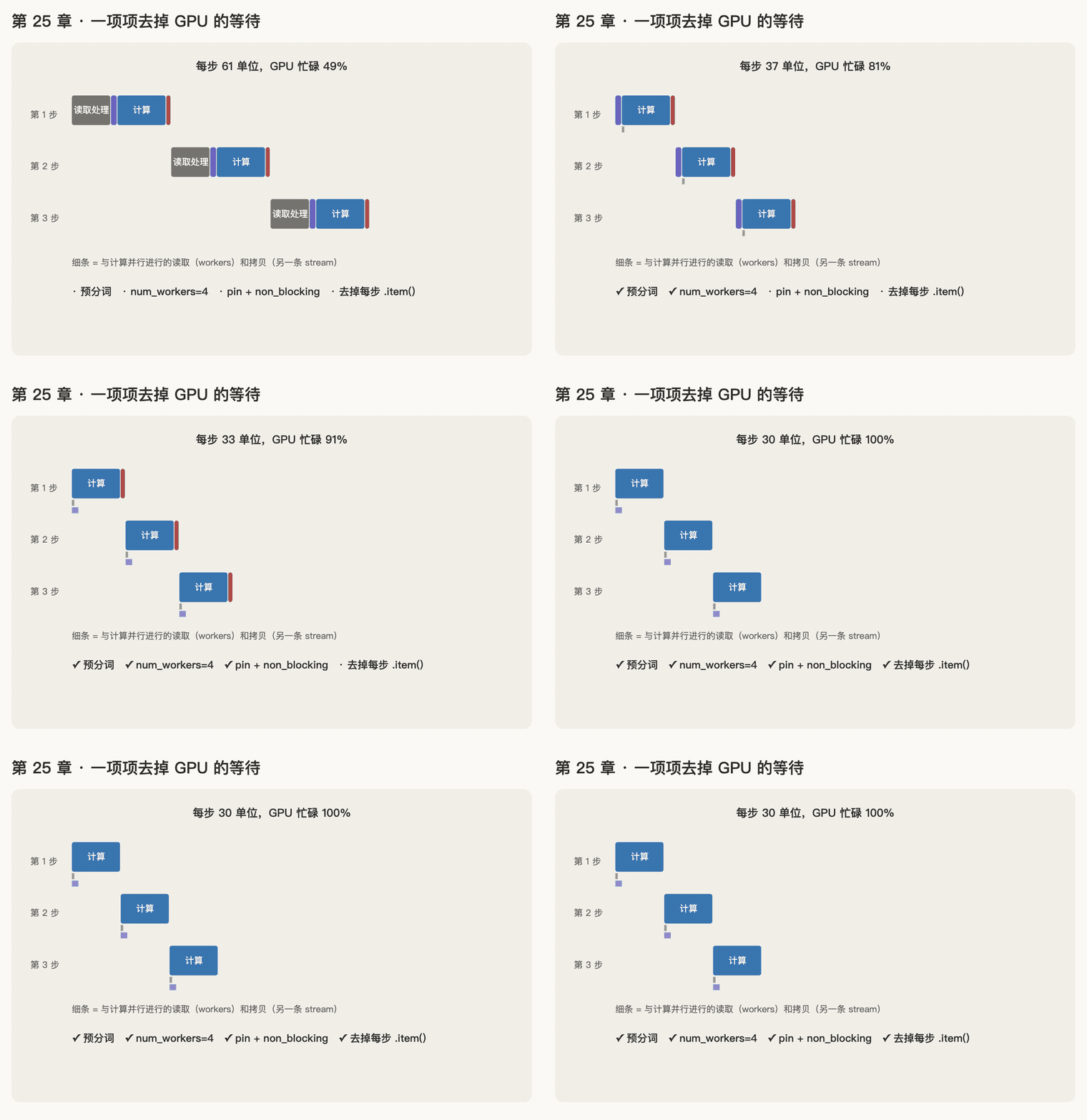
可交互版:animations/25-input-pipeline.html。四个开关可以单独开关:预分词、num_workers=4、pin_memory + non_blocking、去掉每步 .item()。
怎么看:
- 时间线上每步拆成:读取处理(灰)、拷贝(紫)、计算(蓝)、同步等待(红);
- 播放时依次打开四个开关,每打开一个,对应颜色的块变短或和计算重叠;
- 右边是每步用时和 GPU 忙碌占比(数字是编的,只看趋势)。
练习与作答记录
题 1:测得等数据 5 ms、计算 45 ms。值得花时间优化数据管道吗?为什么?
作答:(待作答)
题 2:下面这行为什么会让每一步都同步?怎么改成每 100 步才同步一次?
total_correct += (logits.argmax(-1) == y).sum().item()
作答:(待作答)
题 3:语言模型预训练,为什么推荐"提前把语料分词存成 token 数组"?它省掉了四段路中的哪几段?
作答:(待作答)
口诀
先拆两段计时,数据不慢别瞎改;
读取、处理、拼盘、拷贝四段路,能离线就离线,能并行就并行,拷贝用 pin 加 non_blocking;
同步点藏在日志和指标里,sync_debug_mode 帮你找;第二条 stream 提前拷下一批。
本章复习卡片
- P87(拆"等数据 / 计算"计时;测量用的 synchronize 测完要删)
- P88(四段路与对应手段;LLM 预分词 + memmap)
- P89(隐藏同步点清单;
torch.cuda.set_sync_debug_mode("warn");GPU 上累计指标) - P90(CUDA 预取:另一条 stream + wait_stream + record_stream)
附录 · 延伸阅读
推荐阅读
| 读什么 | 读哪里 | 读它为了什么 |
|---|---|---|
| ★ AISPE 第 13 章 | ch13.md 第 1021–1097 行(计算流 + 传输流预取)、第 1552–1561 行(数据输入流水线) |
本章第二、四步 |
| ★ 官方文档 CUDA semantics | "Use pinned memory buffers"、set_sync_debug_mode(〔在线〕) |
pinned memory 与同步检测 |
| CS336 a1 handout | 数据加载与 np.memmap 的说明 |
预分词 + memmap 的作业版 |
| NVIDIA DALI / WebDataset 文档 | 概览(〔在线〕) | GPU 解码、大分片格式 |
数学原理
- GPU 忙碌占比 = 计算时间 ÷(计算 + 不能重叠的等待)。数据与计算完全重叠时,每步时间 = max(数据, 计算);串行时 = 数据 + 计算。
公式清单
| 写法 | 意思 |
|---|---|
pin_memory=True + .to(dev, non_blocking=True) |
异步拷贝 |
torch.cuda.set_sync_debug_mode("warn" / "error") |
揪出同步点 |
running += loss.detach(),隔 N 步 .item() |
GPU 上累计指标 |
wait_stream + record_stream |
跨 stream 使用张量 |
np.memmap(path, dtype=np.uint16, mode="r") |
按需读 token 文件 |
代码对照:把本章的数字用代码算一遍
用 torch 把讲义里的数字跑一遍。代码在仓库本地
pytorch-deep-dive/solutions/chapter-code/ch25_input_sync.py,配套测试tests/test_ch23_28.py;同一章的 notebook:notebooks/ch25_input_sync.ipynb(讲解和代码放在一起,一格一格边读边跑)。Mac 上直接能跑,不需要 GPU:
bash
cd pytorch-deep-dive/solutions/chapter-code
uv run python ch25_input_sync.py   # 一步一步打印
uv run pytest tests/test_ch23_28.py
讲义 ↔ 代码:
| 讲义 | 公式 / 说法 | 写法 | 跑出来 |
|---|---|---|---|
| 第一步 等数据占比 | 18 ÷ 48 | data_wait_share(18, 30) |
37.5% |
| 第三步 GPU 上累计 | 最后只取一次 | accumulate_on_device(...) |
2.5 |
关键几行:
running += loss.detach()                  # 不 .item(),不同步
(running / n).item()                      # 最后同步一次
代码里才看得到的 1 件事:
detach()别忘了:不然累加会把每一步的账本都连起来,越占越多。
自己改一改(不影响练习答案):
- 在有 CUDA 的机器上加
torch.cuda.set_sync_debug_mode("warn"),在循环里调.item()看警告。